MiniMax H3 Recast: Pricing & Alternatives
Learn how MiniMax H3 Recast replaces people in existing video, what it costs, how to prepare references, and when a different workflow makes more sense.
When a shot already has the right performance, generating it again can lose the movement you wanted to keep. MiniMax H3 Recast starts with that finished shot and changes its cast using person photos. It is a different task from making a new video from a reference image.
You can use the MiniMax H3 Recast tool on this site with a 5–15 second MP4 and one to four photos. This guide explains how to choose your inputs, understand the cost, and decide whether Recast or another workflow fits the job. This guide reflects the formats, controls and credit prices available in the tool on October 12, 2026. Review each result before you use it: character replacement does not guarantee that every detail survives unchanged.
What MiniMax H3 Recast does
MiniMax H3 Recast takes an existing video plus a photo of each replacement person. It is designed to retain the source motion, camera movement, cuts and audio while recasting the people.
That means the original voices remain. A new-looking person may still speak with the original person's voice. Recast is not a voice replacement or lip-sync workflow, and it is not a conventional face overlay: clothing and other character details can change too.
| Input or output | Supported here |
|---|---|
| Source length | 5–15 seconds |
| Source format | MP4, up to 40 MB |
| New people | 1–4 JPG, PNG or WebP photos, up to 10 MB each |
| Instructions | Optional, up to 2,000 characters |
| Resolution | 768p or 1080p; 768p selected initially |
| Sound | Source sound |
Trim longer footage into short, reviewable clips before upload. Output aspect ratio follows the source; there is no aspect-ratio switch or independent duration control in the tool.
A visual example of the replacement
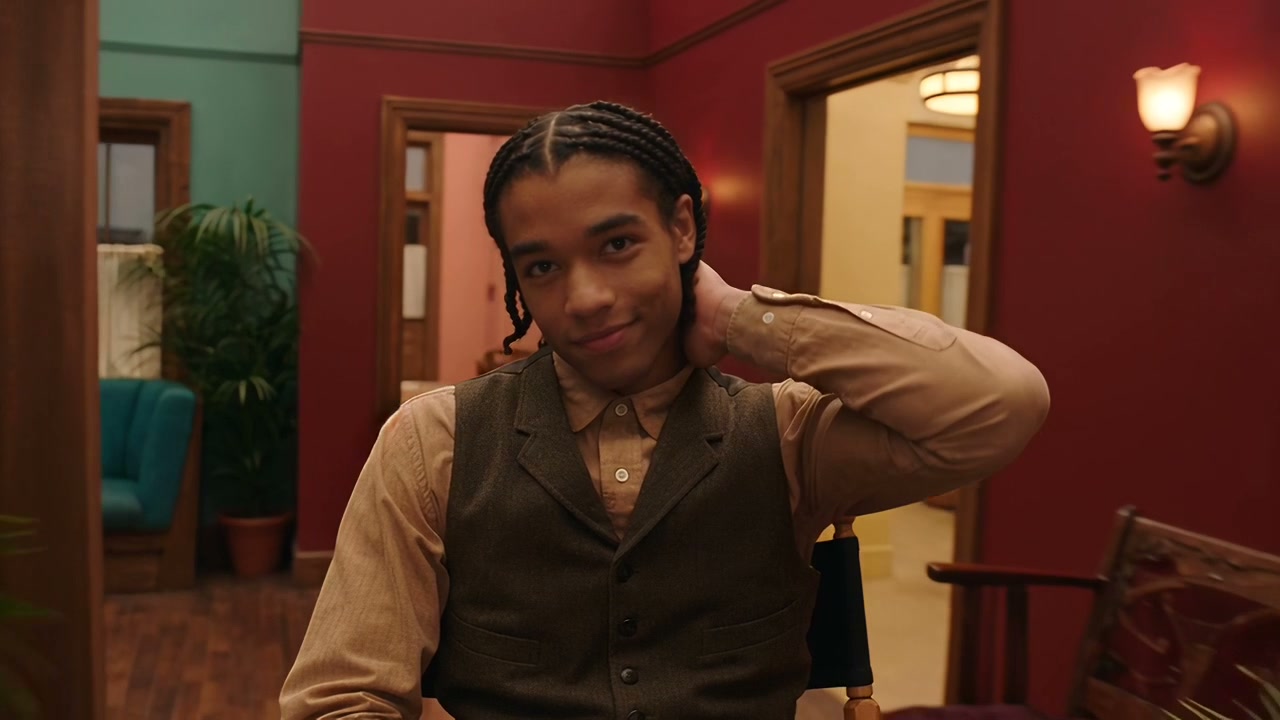

Model demonstration, not generated through this website. The red room and hand-to-neck gesture remain recognizable while the person and wardrobe change. Compare the full clips on the Recast tool.
Prepare your video and person photos
Start with a clip whose performance you want to preserve, rather than a clip you hope the model will repair. Keep people visible enough to identify throughout the shot. Fast motion blur, heavy occlusion, tiny faces and people crossing in front of each other make mapping harder to judge.
Use one clear photo per new person. A well-lit face with visible hair and intended wardrobe gives the model a more useful reference than a distant group photo. If preserving a particular costume matters, make that explicit and inspect the result: do not assume a face photo also specifies all clothing.
Order the photos to match the main people from left to right in the source. That is the default mapping. If people move around or several characters are similar, explain the mapping with visual descriptions in the optional instruction.
Only upload footage, photos and likenesses you have permission to use. Source audio also needs to be yours to reuse.
How to use MiniMax H3 Recast on this site
- Open the Recast tool and select a 5–15 second MP4.
- Select one to four person photos in the intended mapping order.
- Add instructions if the mapping is ambiguous. Leave the field empty for a simple case.
- Choose 768p or 1080p and review the displayed credits. Confirm permission to use the media.
- Sign in and generate. Review the returned clip before downloading it.
The following is a suggested instruction, not a claim about a tested output:
Replace the person in the red jacket on the left with the person in photo 1.
Replace the person wearing glasses on the right with the person in photo 2.
Keep the original gestures, camera movement, shot timing and soundtrack.
Avoid rewriting the entire scene as though this were text-to-video. State who changes, then the parts of the source that matter most to you. The optional realism control requests more natural skin texture and blending; it is not a guarantee of a particular look.
MiniMax H3 Recast pricing
MiniMax H3 Recast uses your shared credit balance. The total depends on source duration and output resolution. Billing rounds source duration up to whole seconds; a 5.2-second clip uses the six-second credit amount. Reference photos are included. Review the displayed total before generating.
| Source length | 768p credits here | 1080p credits here |
|---|---|---|
| 5 seconds | 139 | 208 |
| 10 seconds | 277 | 415 |
| 15 seconds | 415 | 622 |
Check the live total in the tool before submitting and use the existing credit packs when you need more balance. A failed or cancelled task automatically returns the charged credits. A completed result that needs creative revision is still a completed generation; another run consumes credits again.
MiniMax H3 Recast alternatives: choose by what must stay
There is no useful universal “best alternative” without knowing which part of the original video matters. Use the required outcome to choose a workflow.
| What you need | Suitable workflow | What to check |
|---|---|---|
| A new person in the same existing take | MiniMax H3 Recast | Identity across cuts, original motion and retained sound |
| A completely new scene using a person's photo | Image-to-video or reference-to-video | A newly generated performance will not duplicate the original take |
| A different background, prop or scene style | A video editing model that explicitly supports that edit | Its current input limits and which parts it preserves |
| A different voice while keeping the picture | A separate audio or lip-sync workflow | Permission, voice quality and synchronization |
| Only a tightly controlled facial change | A dedicated face-swap workflow | Whether body, wardrobe and shot continuity also meet your needs |
For a new scene, MiniMax H3 Max is available here. For planning several visual references, use the reference-to-video prompt builder. These are adjacent workflows, not equivalents to editing an existing performance.
If you need a MiniMax H3 Recast alternative because the clip is too long, try trimming it into shorter shots first. A different model can change the creative result as well as the limits. If the reason is cost, compare the real total for your source length, including retries, rather than comparing a minimum advertised price.
Review the output before you use it
Watch the entire clip, including transitions. Pause after each cut and check whether the new person still matches the reference. Look at hair, glasses, fingers, clothing and nearby props. Listen to the original soundtrack in context: retaining audio does not mean the new-looking cast has new voices.
When the mapping is wrong, simplify the source to one clearly visible person or clarify which reference belongs to which source person. When blending looks wrong, try a clearer reference with a compatible angle and lighting. These are preparation suggestions, not tested success rates.
For character and shot vocabulary, the prompt library provides examples you can study. When the original take is already right, keep Recast instructions focused on the change instead of replacing the whole scene description.
Questions about MiniMax H3 Recast
Is MiniMax H3 Recast the same as H3 Max?
Recast changes people in existing footage. Ordinary H3 Max generation creates new footage from text or images. Sharing a model family does not make their inputs or prices interchangeable.
Does MiniMax H3 Recast require a prompt?
No. A source video and reference photos are required. The prompt is optional and helps explain who becomes whom or what should stay fixed.
Can I use a 30-second video here?
Trim it first. The site's tool accepts 5–15 seconds. Split a longer source into shorter, reviewable takes before upload.
Can I replace four people at once?
The tool accepts up to four reference photos, one per new person. Supply them in mapping order and check the output carefully. This is an input allowance, not a guarantee that a crowded scene will work on the first try.
Is there a free Recast run?
Recast uses the site's shared credits at the displayed cost. A 5-second 768p run costs 139 credits; the ordinary H3 introductory video allowance does not cover that amount. Review your balance and credit packs before submitting.
Ready to work with an existing take? Open MiniMax H3 Recast and start with one short, clearly mapped clip.
More Posts

MiniMax H3 Turbo: 4 vs 6 vs 8 Steps, and Which LoRA
Four Turbo LoRA lines now compete to run MiniMax H3 in 4 steps. Which checkpoint fits your task, why both authors point at 6-8 steps, and what 5x faster actually means.


MiniMax H3 First and Last Frame: How to Write FL2VA Prompts
MiniMax H3's first and last frame mode needs an alignment line, one shot, and a written middle. The exact FL2VA format, six use cases, and why last frames miss.

What Is MiniMax Design? What It Makes, Where It Falls Short
MiniMax Design is MiniMax's desktop app for AI video — the app formerly called MiniMax Hub. What you can actually make with it, and where it runs out of road.
Generate your first video with MiniMax H3 — right now
Create videos from text or a reference image, with ready-to-use prompt examples to help you get started. No downloads — just open it in your browser.