What Is MiniMax H3 Image? 4K, Editing, and How to Try It
MiniMax H3 Image generates and edits still images at up to 4K. Compare its modes, see what to check in the output, and copy a prompt for your first test.
Give MiniMax H3 Image a product photo and a lighting reference, and you can ask for the same speaker on a walnut table under warm side light. Start with a written brief and an empty canvas, and it can lay out a poster with a headline, a ceramic vase, and space for event details. Those are two different jobs. In the first, the product already has a shape that needs to carry through. In the second, the brief decides everything in the frame.
MiniMax H3 Image is MiniMax's open-weight model for generating and editing still images. MiniMax announced it on November 11, 2026, with native 4096 × 4096 square output and support for up to 16 reference images. The model card describes one set of weights for generation and editing. It shares the H3 text encoder and uses a still-image architecture with the audio branch removed. For moving shots with sound, see the MiniMax H3 video model guide.
Which mode should you start with?
| Your starting point | What to choose | What to inspect first |
|---|---|---|
| A written brief | Text-to-image | Composition, exact headline, and room for copy |
| Product, subject, or style references | Reference-based generation | Which details made it into the new scene |
| An image that is nearly ready | Image editing | The requested change and the surrounding details |
Reference-based generation and image editing use the same edit endpoint in MiniMax's API. The distinction matters when you write the brief. To create a new setting, tell the model which traits to borrow from your reference. To revise an existing image, identify the base image and describe the part to change and the parts to preserve. For example, a new product shot might borrow only the shape of a lamp, while an edit to a finished banner also needs to keep the crop, text position, and background.
What can MiniMax H3 Image make?
Posters and editorial images
APPSO's hands-on report shows a poster with a headline and subtitle, and a mock letter that asks the model to handle much smaller type. Use a poster to check two skills at once. Can the model put the words where you asked, and can it give those words enough space to read? A readable title at thumbnail size can still contain a spelling error when you zoom in. Review the small print and line breaks at full size. For print production, set dates, legal copy, and anything that must be exact in your layout software.
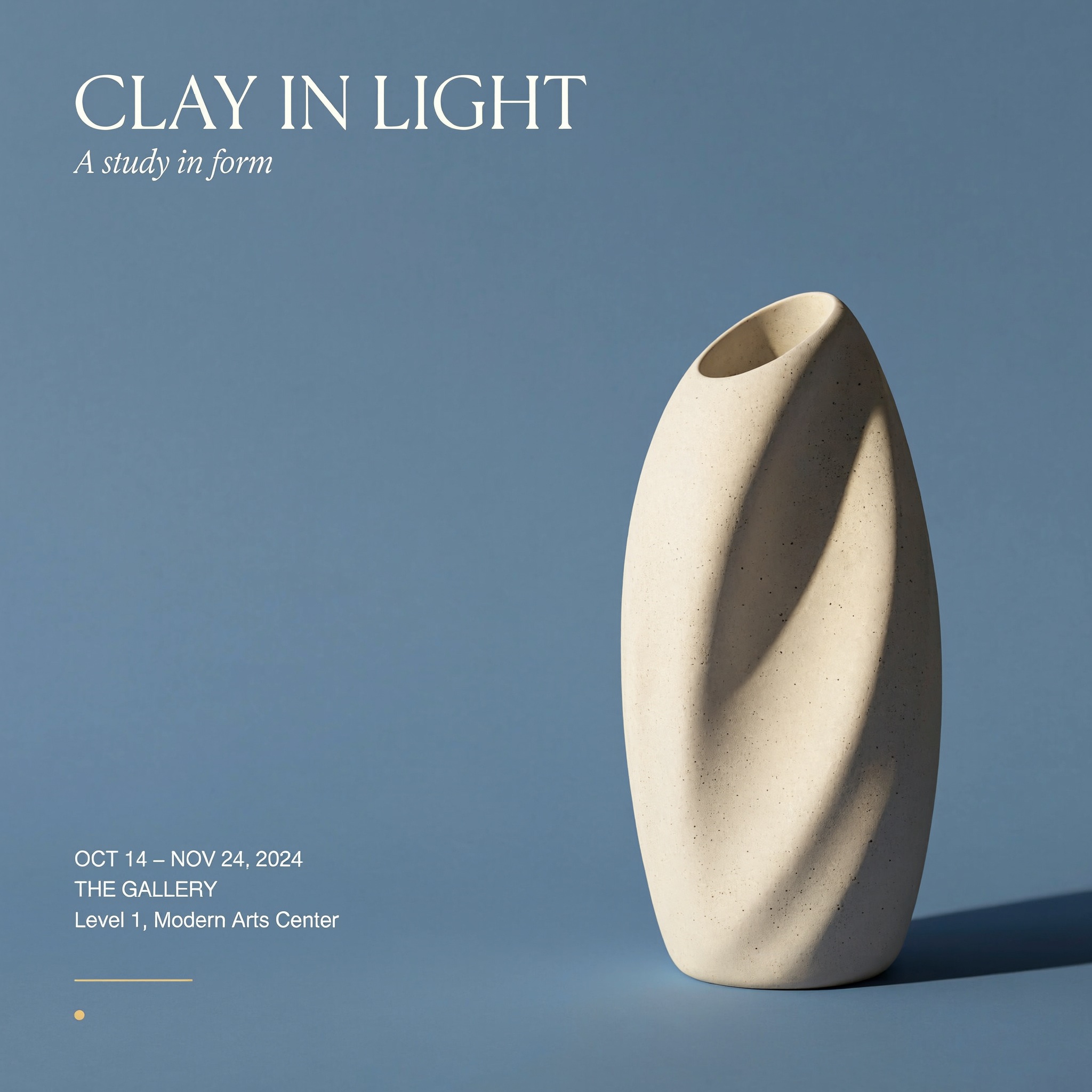
Poster layout test
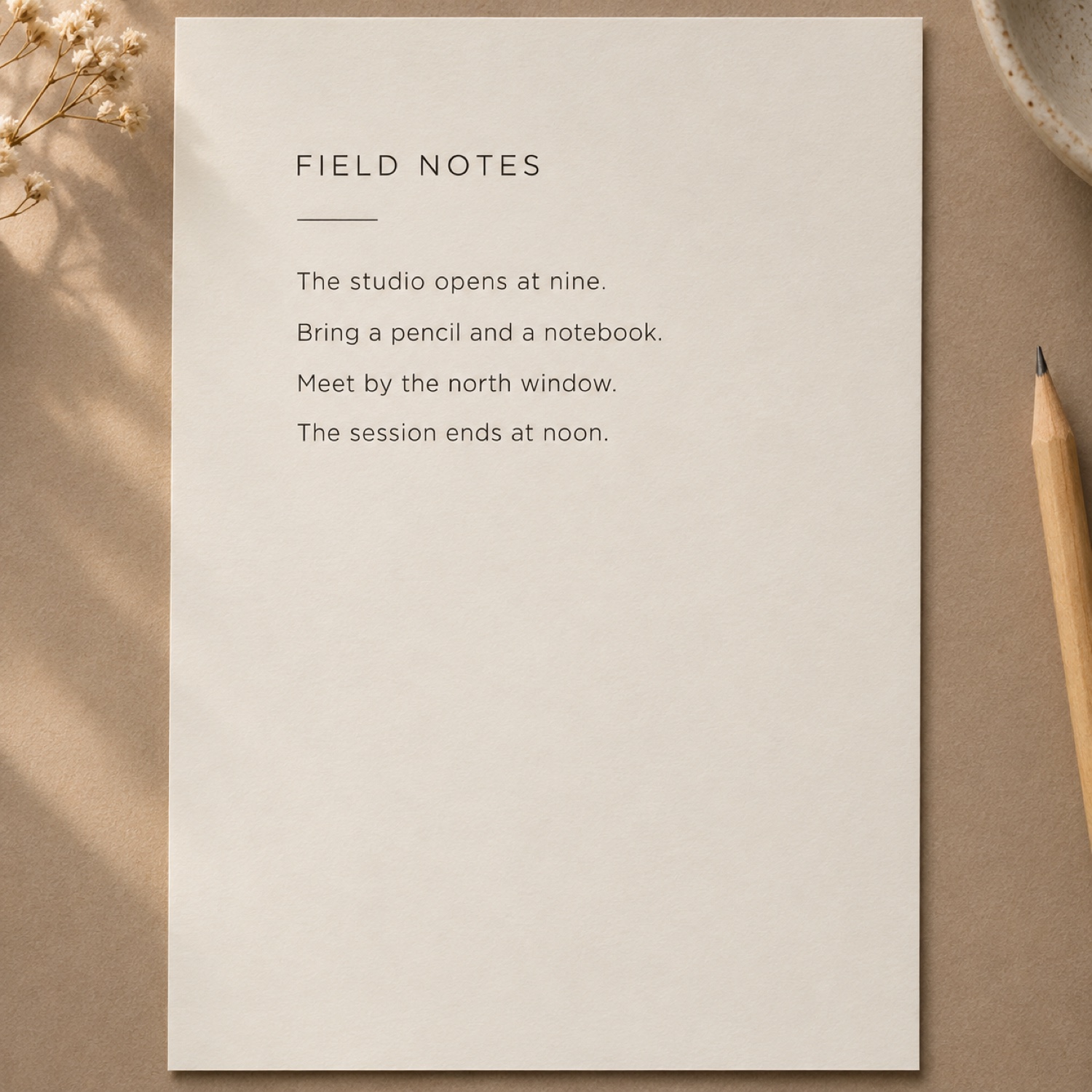
Small-type letter illustration
Product scenes and variations
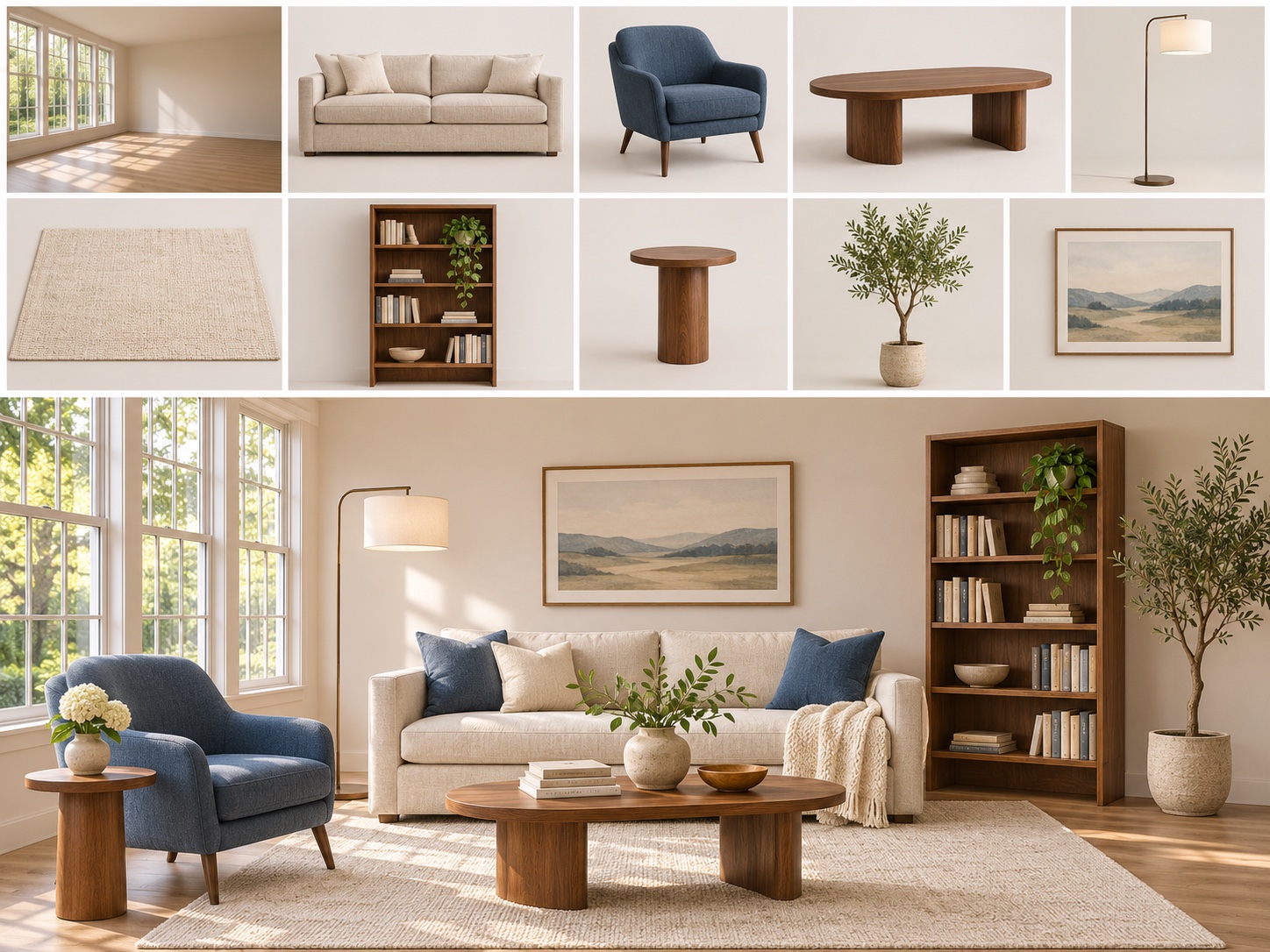
The model card shows a composition built from ten inputs, one empty room and nine pieces of furniture. This is a useful example of scene assembly. You can give the model the actual objects and a target room, then judge the result against the set you supplied. For a product listing, compare the silhouette, hardware, and material finish with the original photo before approving an image.
In our multi-reference product test, the speaker's four buttons stayed in order and the walnut table picked up the warm side light. The weave on the grille changed into a stronger diagonal pattern. If that fabric is a selling point, the difference matters more than how polished the new lighting looks.
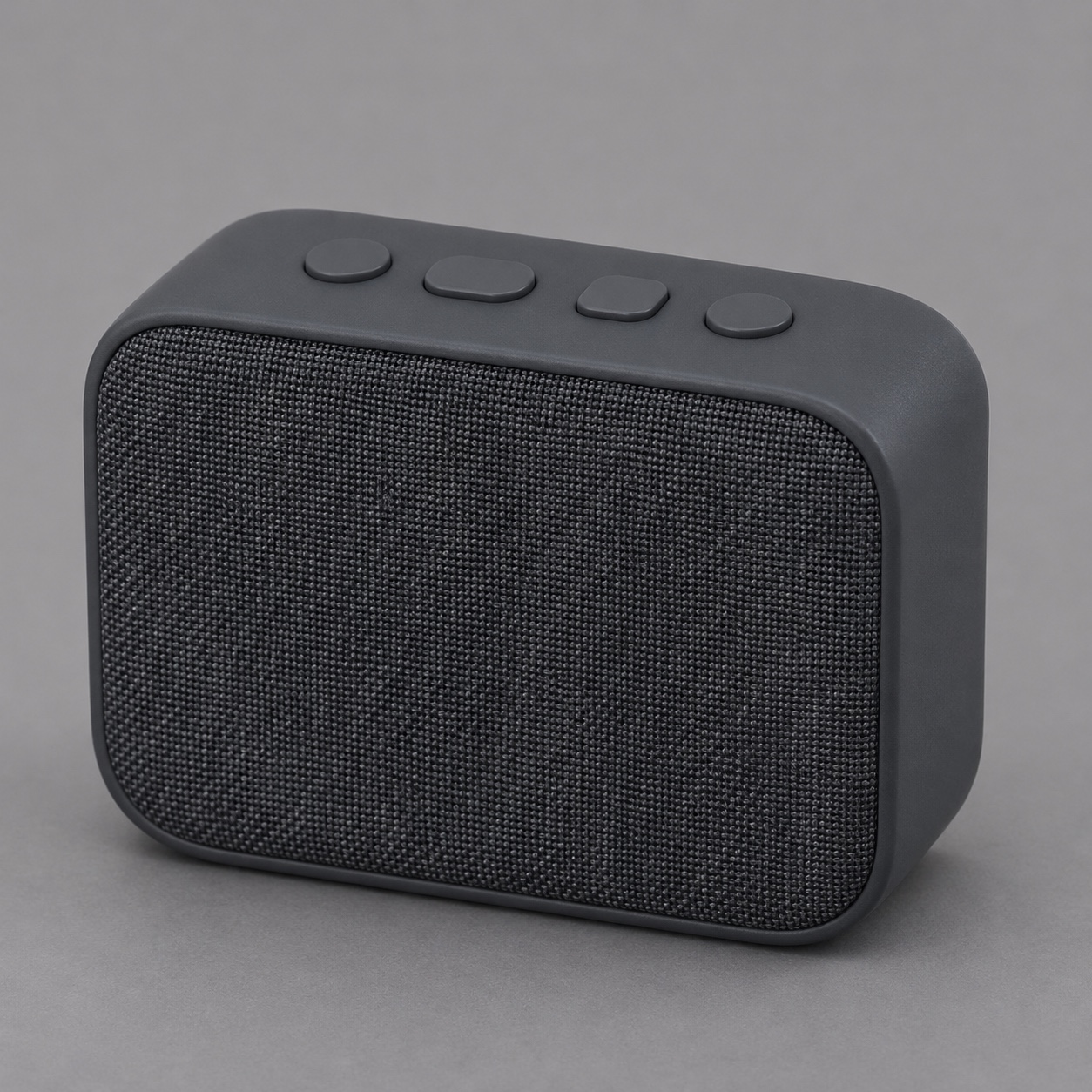
Product reference
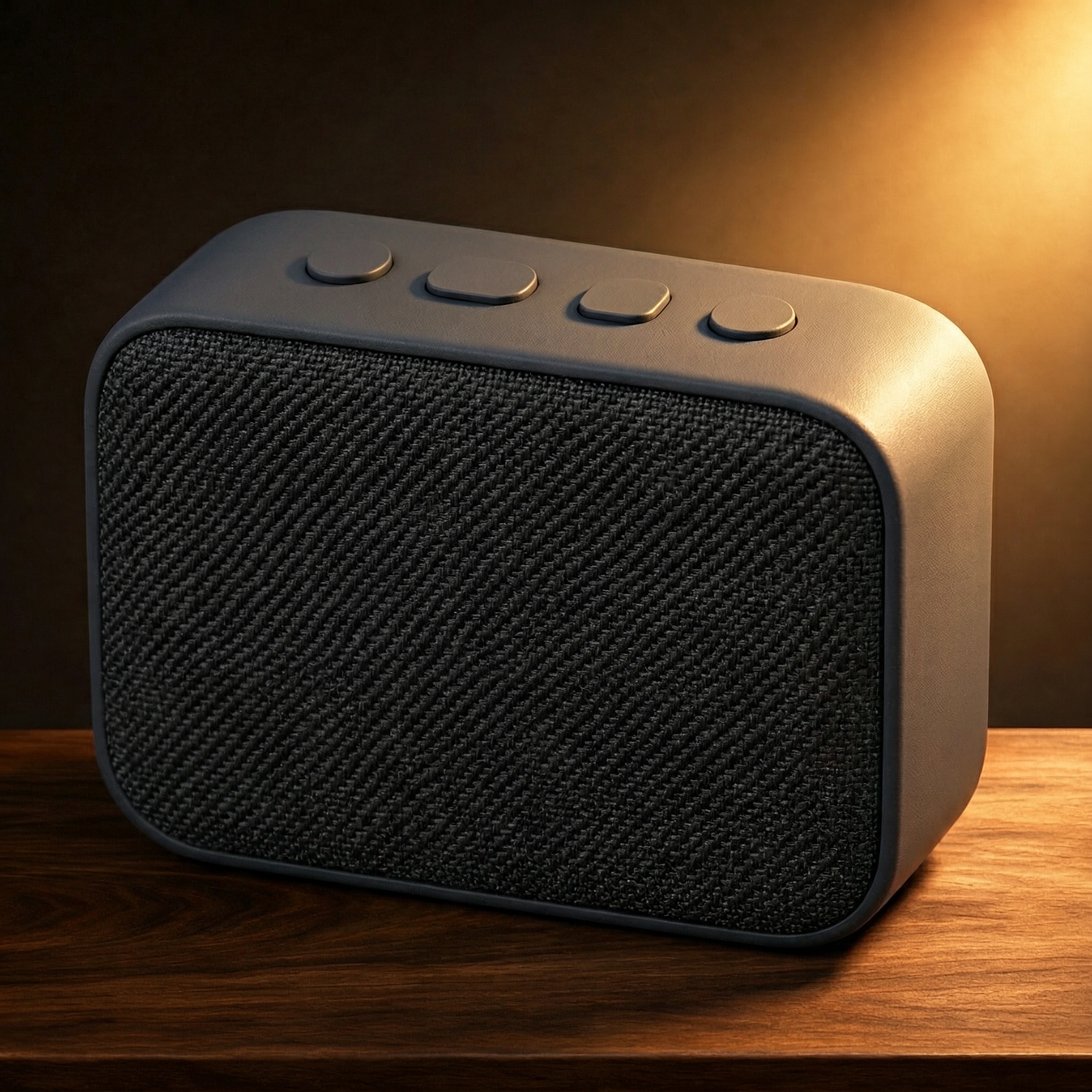
Test result in the new setting
Technical illustrations and concept art
APPSO used an exploded coffee-machine view to test part relationships. 新智元 reported a separate experiment in which it asked for a miniature spotlight to be separated into seven components, with three screws. A visual like this can help a team discuss how to present a product. Check every label, count, and attachment point against the original drawing before the illustration becomes a product diagram.
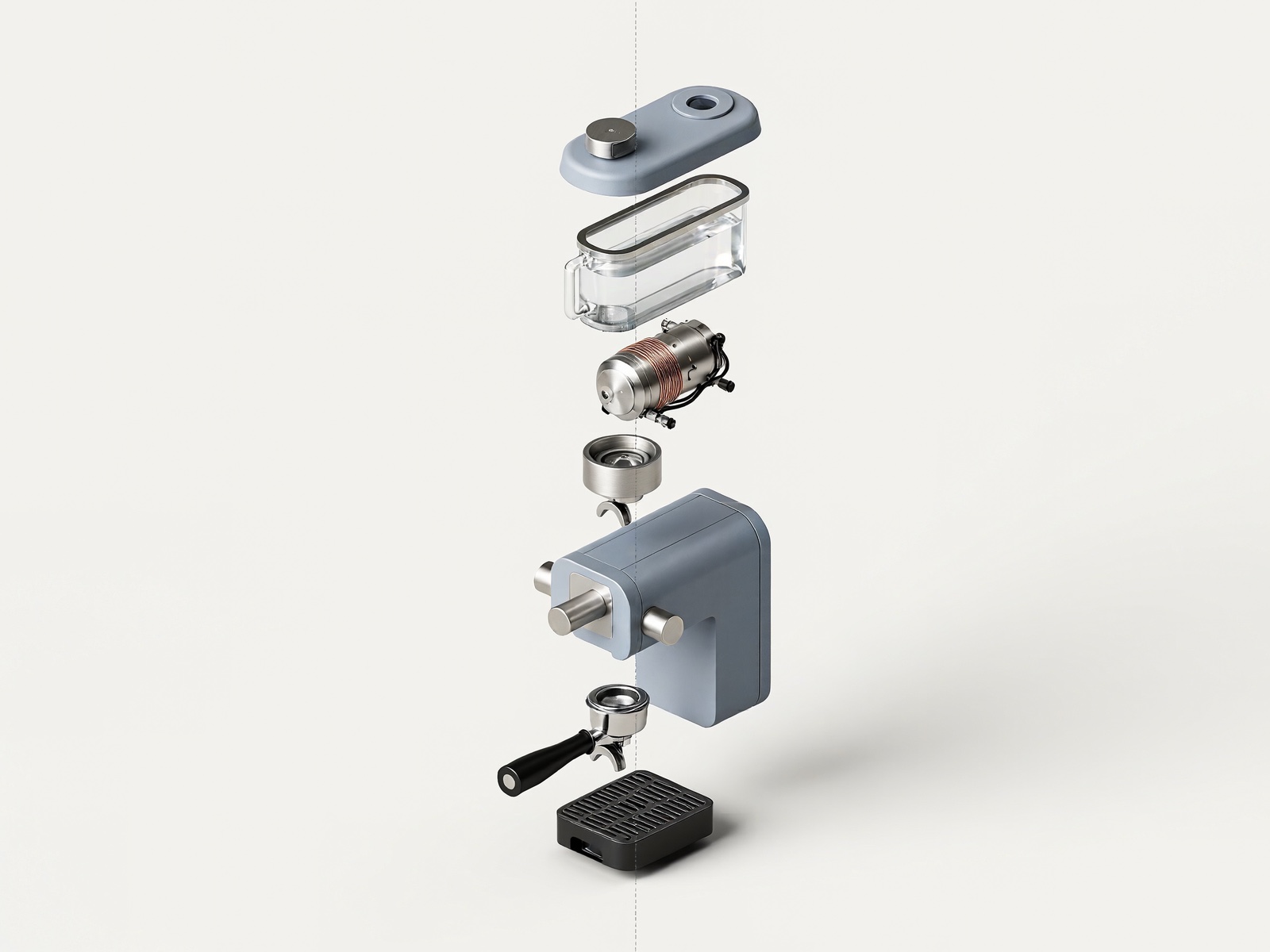
Espresso machine · MiniMax H3 Image test
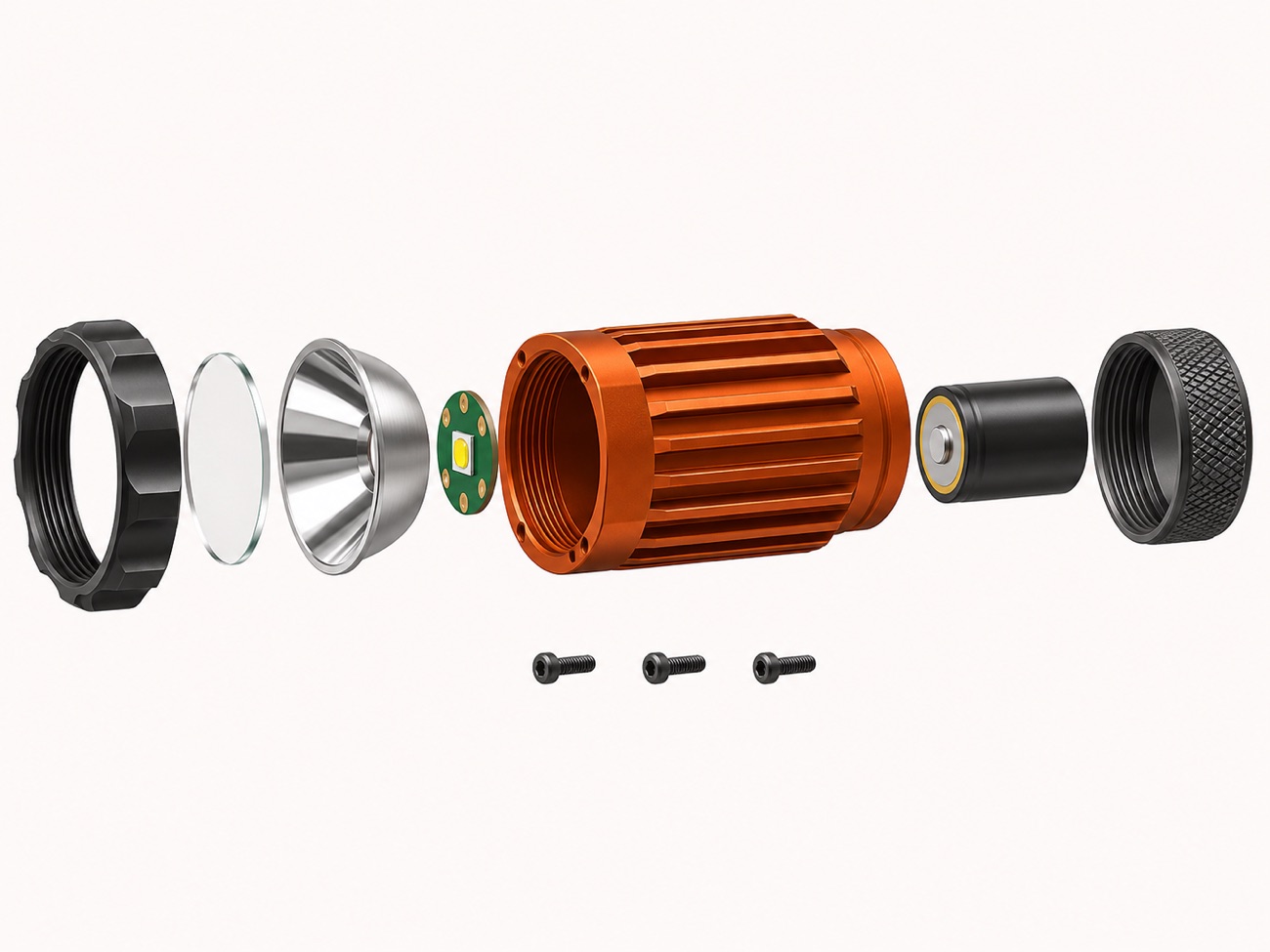
Miniature spotlight · Original illustration
MiniMax also published a game-map example. It took a marked position on an illustrated map and generated a first-person view toward the landmarks. This is useful for previewing how a location might feel from player height. Compare the order of the landmarks, the scale of the objects, and where the viewer is standing before using the image as a design reference.
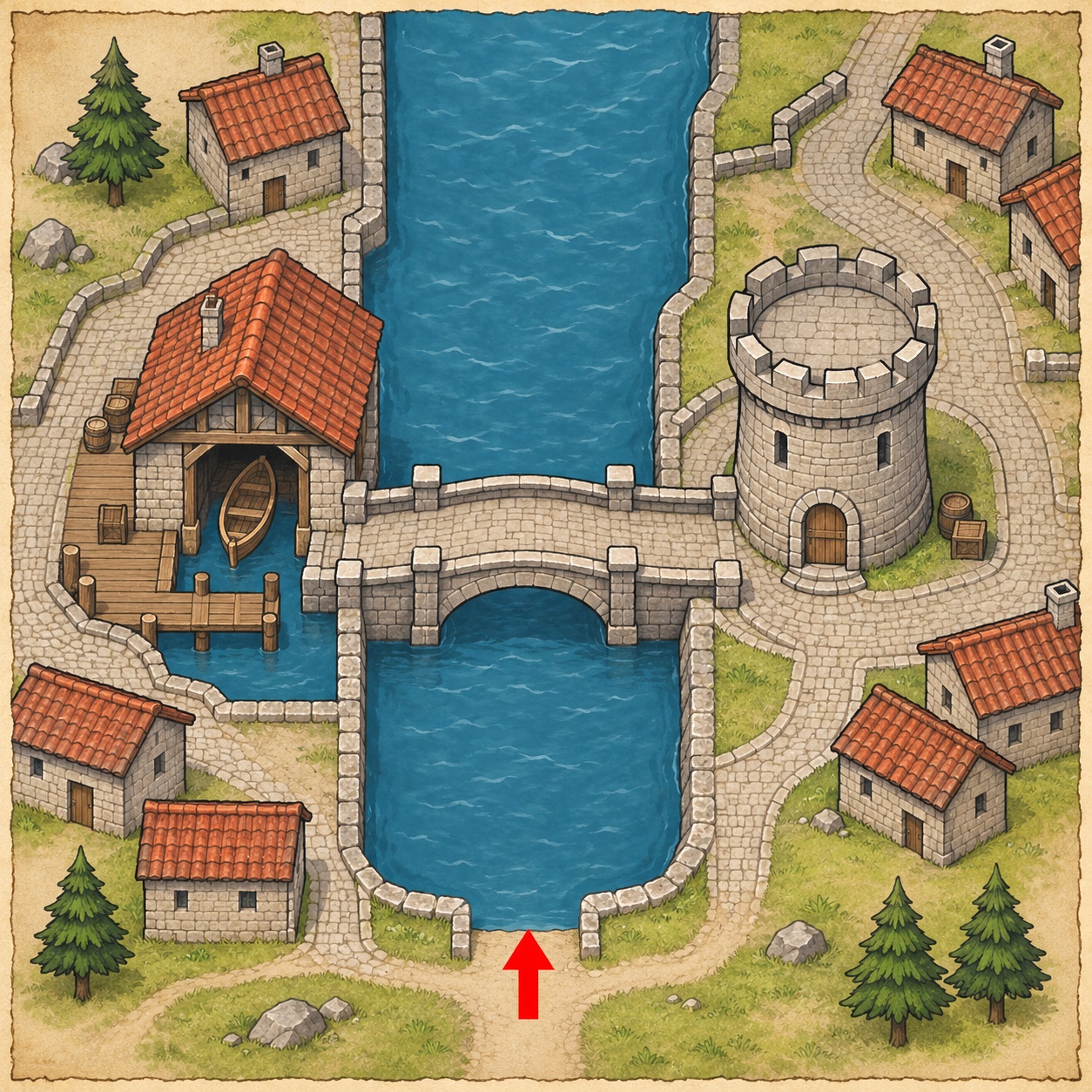
Viewpoint on the map
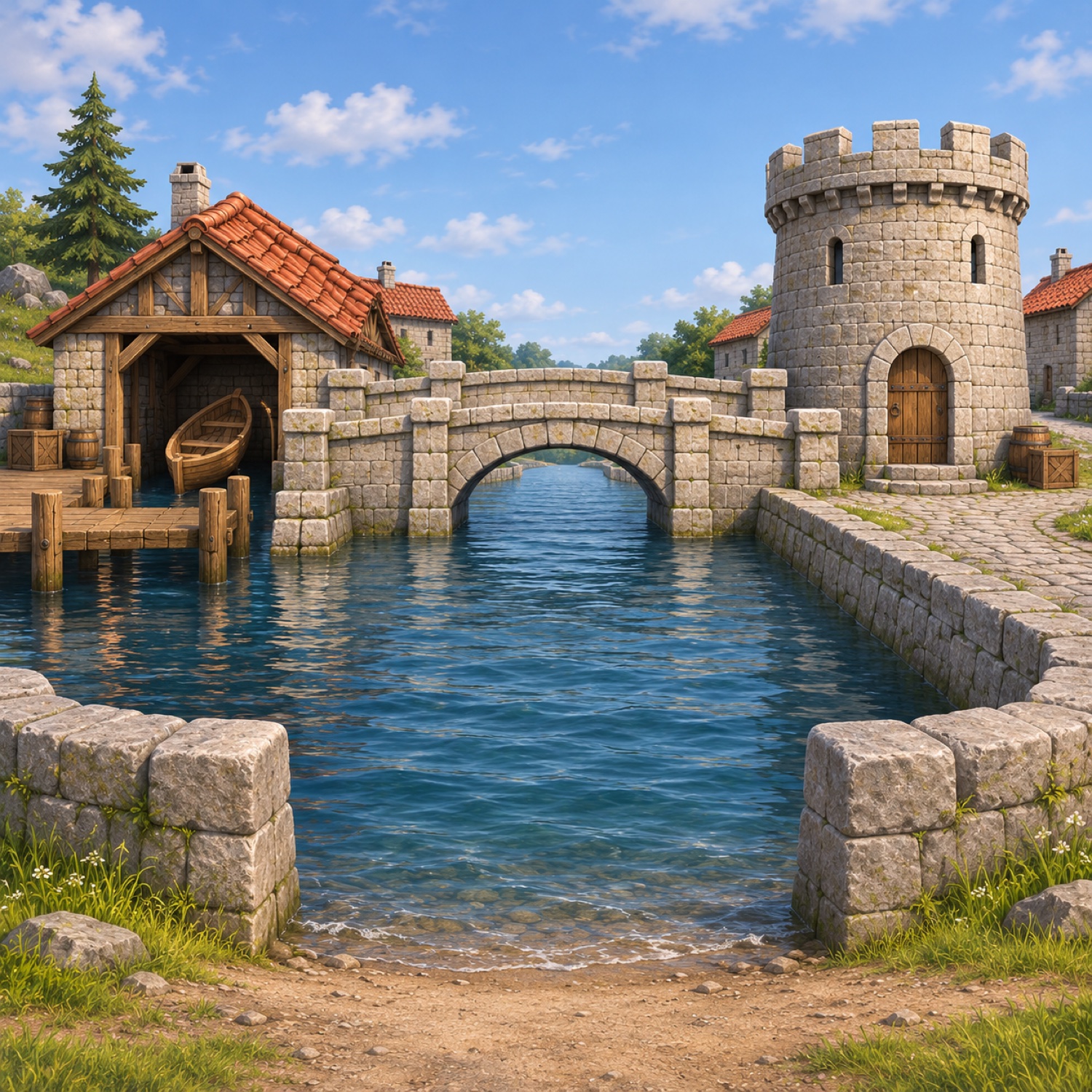
Illustrated view from that direction
Where the result needs a second pass
Small edits can affect the rest of the image. MiniMax's API guide lists instruction-based edits and currently excludes masked edits. If you ask it to swap a vase, compare the border, text, and object positions with the original. When the surrounding pixels must stay fixed, keep the approved image as a layer and composite the new object separately.
Background and file format are separate choices. The API supports PNG, JPEG, and WebP, and lists transparent backgrounds as unsupported. A PNG export by itself gives you the image format. For a transparent product cutout, plan a background removal step.
References guide an output. If a logo, a product label, or a character's face must remain exact, reserve time for a side-by-side check. Adding more references gives the model more information to reconcile. For an early test, start with the image that shows the detail you care about most.
What does 4K mean for a still image?
In MiniMax's API guide, 1K, 2K, and 4K describe output area presets. The aspect ratio determines the actual width and height. For example, these are the dimensions the guide lists for three common shapes.
| Shape | 2K | 4K |
|---|---|---|
| Square, 1:1 | 2048 × 2048 | 4096 × 4096 |
| Wide, 16:9 | 2720 × 1536 | 5472 × 3072 |
| Portrait, 9:16 | 1536 × 2720 | 3072 × 5472 |
Set the shape for the placement first. If the asset is a full-width web banner, check the crop on a narrow screen before spending another run on extra pixels. If you already approved a 2K composition, treat a fresh 4K generation as another version and recheck the parts you approved. The API also accepts explicit dimensions within its documented limits.
MiniMax reports a sub-10-second 4K generation result in its launch announcement. APPSO reported roughly 10–20 seconds in its own 4096 × 4096 tests. Each figure describes its own setup. For scheduling a real project, time a request from submission until you can download the image, and record the model variant, output size, and number of images.
Where can you try MiniMax H3 Image?
| Route | Where to start | When to use it |
|---|---|---|
| Browser | Open Hailuo AI's image creation page and choose MiniMax H3 Image in the model menu when available. | You want to try one prompt or an edit. |
| Desktop | Open the H3 Image feature in MiniMax Design. | You work with a set of references and need multiple revisions. |
| API | Use the model ID MiniMax-H3-Image. MiniMax documents separate generation and editing endpoints, and a Highspeed variant. | You need controlled sizes and repeatable requests. |
| Open weights | Look up the MiniMax-H3-Image model card and the community license. | You are evaluating local or self-hosted inference. |
In a hosted interface, confirm the model, output count, and displayed price or credit allowance before generating. Our image studio is the entry point for the models offered on this site. To try the same workflow, use the model named in each test.
For self-hosting, check disk and hardware needs as well as the license. MiniMax's model card lists roughly 69 GB for the unquantized image package and a separate 66.7 GB shared text encoder, which can be reused if already present. The H3 Image Community License excludes the U.S., EU, U.K., and South Korea from its applicable territory and sets additional terms for commercial use and third-party hosting.
A first test you can check in a minute
Start with a square poster. It gives you four checks you can see right away: spelling, layout, lighting, and whether the empty space stays empty.
Design a square exhibition poster for a fictional ceramics show.
Set the headline exactly as “CLAY IN LIGHT” near the upper left.
Set the subtitle exactly as “A study in form” directly underneath.
Place one off-white ceramic vessel on the right, lit from the left.
Use a muted blue background and keep the lower left open for event details.
Leave all other areas free of lettering.
The poster shown above is a single 2048 × 2048 result. The recorded request time was 11.77 seconds.
I ran the English prompt above once with MiniMax H3 Image and prompt expansion enabled. The headline and subtitle were correct, and the vase sat on the right. The lower left contained an invented date and venue. The returned expanded prompt had already added those details, even though the submitted brief reserved that area as blank.
If that happens in your workflow, inspect the expanded prompt when the interface shows it. To improve the layout on a retry, describe the space as a plain blue area that must stay blank. To test the expansion step on its own, keep the prompt and dimensions fixed and turn off expansion where supported. MiniMax's text-to-image API provides that option. The image above is the first result.
- Select text-to-image and request one square image at 2K, if offered.
- Open the file at full size. Read the headline and subtitle character by character. Check the lower left at the size where the date and venue will go.
- Change one instruction for the next draft. If the type is right and the vase is too large, adjust the size or position of the vase. Keep a copy of the best result so you can compare.
If the brief starts with existing product or character images, use the MiniMax H3 Image multi-reference tutorial. It shows the source files and results for product photography, character consistency, and object replacement.
More Posts

Camera Keyframes in H3 Max Multi Angle: A Working Guide
H3 Max Multi Angle takes four numbers per camera keyframe, not prompt words. What each does, the three that trip you up, and how to build an orbit that reads.

MiniMax H3 Recast: Pricing & Alternatives
Learn how MiniMax H3 Recast replaces people in existing video, what it costs, how to prepare references, and when a different workflow makes more sense.

H3 Max Live for Livestream Creators: 5 Pilot Formats
Five H3 Max Live pilot formats for livestream creators, with moderated prompt workflows, continuity checks, fallback plans, and a controlled 30-minute test.